
Mechanical keys work until they do not. Lost keys, rekey costs, and no record of who came and went all point to the same fix — but the fix has a reputation for being disruptive, and that reputation is why a lot of businesses put it off.
It does not have to be. This guide lays out a low-friction path from keys to credentials: site assessment, matching hardware to each opening, credential choices, roles and schedules, phased installation, and the training that determines whether any of it sticks.
Comtex Technologies has designed and installed access control systems for Alabama businesses since 1985, with offices in Montgomery and Birmingham. We hold AESBL #1725 through the Alabama Electronic Security Board of Licensure — worth asking any prospective vendor for.
Start with a site survey, not with software
A rollout starts at the door. Walk the property and document:
- Doors to control now, later, and never. Public entrances, employee doors, sensitive rooms, shared entries. Not every door needs a reader, and deciding that early keeps the budget honest.
- Door condition and hardware. Glass storefronts, hollow metal, wood interiors, maglock versus electric strike candidates, hinges, closers, and frame quality.
- Life safety context. Required egress paths, fire alarm interface needs, and any door that must unlock on a fire alarm signal.
- Traffic patterns and schedules. Opening hours, shift changes, vendor deliveries, and exceptions like events.
- Power and pathways. Power supply locations, conduit or surface raceway options, and cable routes that avoid tearing up finished space.
A good survey also finds the integration points with video surveillance and alarm systems, so doors, events, and footage line up when you need to review an incident.
Match hardware to the opening and the code
The door determines the hardware.
Electric strikes for most latch-and-closer doors, where free egress is preserved by the handle.
Magnetic locks when strikes are not practical — paired with request-to-exit, door position monitoring, and proper life safety release.
Trim and readers sized for glass storefronts, aluminum frames, and vestibules without weakening the opening.
Power supplies sized to the lock draw, with battery backup and fire alarm tie-in where required.
Code-compliant egress is not negotiable. Doors used for exit must allow free egress without special knowledge, and many must unlock on a fire alarm signal. Review with the local authority having jurisdiction during design, not after installation.
Choose credentials that fit users and risk
Most businesses end up with a mix.
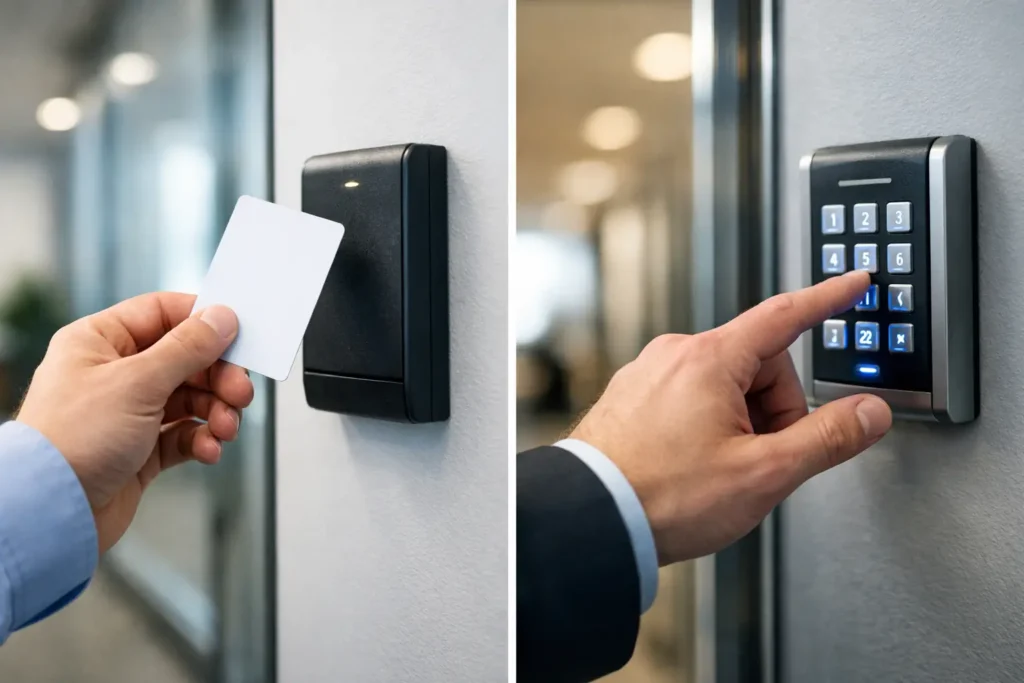
- Cards and fobs are durable, straightforward, and easy to issue or revoke.
- Mobile credentials reduce plastic and can support multi-factor prompts on the phone people already carry.
- PIN codes work for low-risk interiors or as a backup at select doors.
- Biometrics suit higher-security needs and should be planned deliberately rather than added because they are available.
Standardize where you can, and use role-based groups so permissions follow the job rather than the person.
Build roles and schedules before cutover
Good permissions are boring on purpose.
Roles define which doors a person can use. Schedules define when — business hours, night shift, cleaning crew windows. Holiday tables and event unlocks handle exceptions without last-minute reprogramming.
Getting this right before installation is what prevents the first two weeks from being a stream of “my badge does not work” calls.
Phase the deployment
Move door by door, in sequence:
- Pre-wire and bench-test controllers, readers, and power before they go on a wall.
- Install during low-traffic hours, keeping mechanical egress intact at every step.
- Verify door position, lock action, request-to-exit, and fire alarm interface.
- Pilot with a small group. Confirm roles and schedules against real scenarios.
- Cut over by entrance or department, not the whole building at once.
For multi-location organizations, cloud-managed access control standardizes roles across sites and lets you respond remotely — which matters when the problem is at a building two hours away.
Train people, not just administrators
This is where disruption actually disappears, and it is the step most often shortchanged.
Front desk and managers need to know how to issue credentials, grant temporary access, pull reports, and handle basic troubleshooting.
Employees and tenants need to know how to present a credential, what to do when a door is propped, and who to call.
After go-live, short refreshers and a one-page quick reference. Add badge etiquette to new-hire onboarding so it does not decay.
Clear contact points and written procedures keep small issues from becoming service tickets.
Change management and offboarding
Define the process and enforce it.
New users get added to a role, not custom-permissioned one at a time.
Contractors get a start date, an end date, a limited door set, and automatic expiration.
Offboarding is same-day. In a managed system, access for a former employee can be removed immediately — typically within minutes of an authorized admin deactivating the credential. This is the single clearest advantage over mechanical keys, where the honest answer is that you do not know how many copies exist.
Audit logs only help if someone reads them. Schedule periodic reviews of active users and unusual access attempts.
Multi-tenant buildings
Property managers and shared campuses have extra complexity.
Use partitioned or multi-tenant capability so each tenant manages its own users and interior doors while the property team controls base building entries and schedules.
Coordinate shared entrances, elevators, and parking gates with timebands that match building hours.
Pair readers at main entrances with cameras covering the approach, the door line, and direction of travel. Reviewing an incident is far easier when the badge event and the footage line up — see our video surveillance systems page for how those integrate.
Contractor access without the mess
- Create contractor roles with limited doors and hours
- Issue mobile or printed temporary credentials that expire on a set date
- Use a check-in checklist covering badging, safety brief, and point of contact
- Require vendor supervisors to request extensions before expiration, rather than handing out open-ended access
Coordinate cabling and network early
Access control depends on clean power and connectivity.
Provide dedicated low-voltage power supplies with battery backup. Use labeled, standards-based cabling to every reader and controller — our structured wiring and data and wireless network work is planned alongside access control for exactly this reason.
Segment management interfaces, enforce unique admin accounts, and keep firmware current.
Verify life safety before declaring victory
Test every controlled opening before go-live:
- Credential grant, deny, and schedule behavior
- Request-to-exit function and door position alarms
- Fire alarm release and any doors that must fail safe
- Unlock schedules, holidays, and event overrides
Document the results and keep them with as-built drawings for inspections and future service.
FAQ
How do I migrate from keys to access control? Site survey, hardware matched to each door, credential selection, roles and schedules defined, then phased installation and training by area — with code-compliant egress preserved at every step.
What are the two most common types of access control? Role-based access and time-based scheduling, delivered on either cloud or on-premise platforms.
Can access be assigned by role and schedule? Yes, and it should be. Roles define where, schedules define when. This is the recommended baseline.
How fast can access be removed for a former employee? Immediately upon admin action — the credential typically stops working within minutes.
How do I ensure code-compliant egress? Select hardware that preserves free egress, integrate with the fire alarm where required, and verify through testing and coordination with the local authority having jurisdiction.
How do I know an access control company is licensed in Alabama? Ask for their Alabama Electronic Security Board of Licensure number. Comtex holds AESBL #1725.
Next step
A well-planned rollout replaces keys with predictable, auditable access while keeping doors safe and operations running.
Comtex Technologies has served Central Alabama since 1985, with 3,874 completed installations and a team that handles design, installation, training, and ongoing support in house — so access control, cameras, alarms, phones, and the cabling underneath them come from one company rather than four.
Montgomery: 4121 Wall Street, Montgomery, AL 36106 · (334) 271-4000
Birmingham: 182 Commerce Drive, Pelham, AL 35124 · (205) 871-3000
Explore access control systems, request a quote, or email sales@comtex.org.
AESBL #1725